Notes on my semi-successful attempt of following my own advice.
I'm working on a Bevy game called Mine Crawler - a 2D game prototype that features some multiplayer functionality. At the moment of writing, it has ~20k lines of code. After working on my project for about 3 months while actively avoiding thinking too much about code organisation, I finally found the energy to do something about my project structure and quickly degrading compile times.
Before you read on
If you are looking for tips on how to organise a Bevy project, I'll be sharing some here. In case you haven't much experience with Bevy, I encourage you not to take the info here as an ultimate tip on how to organise your codebase. Your best bet is not to overthink or spend time moving the code around, but to actually implement something, make a game prototype and earn much more valuable experience of developing a project. Once you are comfortable enough to work with Bevy, then refactoring and optimising will start bringing better results as well.
Among other things, I'll be sharing my own experience of following already existing advice on how to optimise compile times. While I won't be offering any unique knowledge on this topic, I hope this post will help to form expectations on how certain steps can help with analysing and improving build times. If you are interested specifically in this topic, I recommend this wonderful blog post: Tips For Faster Rust Compile Times [webarchive].
And if you haven't yet applied the fast compile configuration from Bevy quickstart, make sure you've gone through it as well. It helped a lot with my own project. (One thing I haven't got a chance to test was cranelift codegen, due to this issue.) As many Bevy devs start with these steps on creating their project, I won't be covering them here.
Organising the project
In this section, I'll be covering modules, plugins and systems organisation. It will contain my opinionated rants as well as a couple of practical tips. There are even more topics I'd like to cover, such as states, schedules, etc, but I haven't explored them much enough to write about them with enough confidence (maybe one day).
Splitting by feature or by abstraction
This is an internal debate I've been taking part in for 10 years since I first created my project with Ruby on Rails. How do I organise my code? As a framework, Ruby on Rails suggested its own way: to split folders by abstractions.
controllers/
  feature1/
  feature2/
models/
  feature1/
  feature2/
views/
  feature1/
  feature2/
It's not a bad way to organise projects, but the first annoyance I stumbled upon was that the project sidebar in my IDE grew too long and it was impossible to switch between different modules within the same feature without scrolling too far or searching a file/class by path.
It's a bit of a pity argument, but I don't think there's much more about folder structure than having to navigate it.
After switching to other ecosystems, I was often trying to adopt the approach where I split folders by features. The results rarely satisfied my "perfectionistic" criterias anyway, so I couldn't completely get myself rid of the doubt whether this is the right approach.
Plugins
If there is a better hint on how to organise a project than your personal preference, it's Bevy plugins! As Bevy source code structure suggests itself, plugins represent different features of a program.
Plugins are a great way to group and organise components, resources and systems. As it often makes sense, plugins represent program features (not random abstractions).
Consider a project where every resource, state, event and system is registered within a single plugin
located in main.rs. Not only it can grow to ridiculous number of lines of code,
it's also really difficult to reason about.
How granular should plugins be?
This feels like a question where one wants to both find the perfect balance
but also without overthinking for too long.
In my latest project, I was definitely procrastinating with bringing the code structure to a standard,
so it wasn't a tough call to finally decide "ok, this abomination called SharedPlugin should finally be refactored".
While not being perfect, my folder structure was already outlining possible plugins:
├── algo
│   └── ...
├── duel
│   └── ...
├── entity_factory.rs
├── gameplay
│   └── ...
├── grid
│   └── ...
├── items
│   └── ...
├── lib.rs
├── objects
│   └── ...
├── player
│   └── ...
├── player_name.rs
├── protocol.rs
├── synced_action.rs
├── synced_message.rs
├── utils
│   └── ...
└── world_gen
    └── ...
In Mine Crawler, there are two main game modes: roaming in the "open world" map and duels against other players or mobs.
As there are not too many gameplay systems revolving around those game modes, for now I decided not to group them in
plugins by separate mechanics (such as movement, using abilities, etc), but rather have just GameWorldPlugin and DuelPlugin.
Some utility systems responsible for syncing messages and game actions were also conviniently formed as plugins
with generic arguments. For example, SyncedActionPlugin<PlayerMovementAction> and SyncedActionPlugin<DuelAction>
encapsulate all the relevant resources, messages and systems, saving me from having to duplicate a lot of code.
impl<T: SyncedActionPayload> Plugin for SyncedActionPlugin<T> {
    fn build(&self, app: &mut App) {
        app.register_message::<SyncedAction<T>>()
            .add_map_entities()
            .add_direction(NetworkDirection::Bidirectional);

        app.init_resource::<SyncedActionBuffer<T>>()
            .insert_resource(SyncedActionPacketIdCounter::<T> {
                packet_id: Default::default(),
                _p: Default::default(),
            })
            .add_message::<FinalizedActionMessage<T>>();

        app.add_systems(
            PreUpdate,
            Self::auto_read_message_system.after(MessageSystems::Receive),
        );
    }
}
It was a good start but there were even more opportunities to improve the project structure.
Use system sets
Really, do use them. Maybe that's actually one of the things I'd encourage everyone to think about as early as possible. While they aren't of a big deal on their own, they help a lot with organising systems and managing their ordering.
I used to manage ordering just by passing systems to after and before methods
(when I didn't want to or couldn't use chain that is), and it was fine at first.
But as the time went by, when I had more than a hundred systems, it became really painful to read.
Consider the following example:
app.add_systems(
    Update,
    sync_grid_pos_with_transform_system.after(player_ability_system),
);
The idea here is to synchronise all the changes to the GridPosition component with the Transform component,
and it's important to do that only after all the systems that can modify GridPosition have finished.
Besides player_ability_system, there's also player_movement_system and others.
After returning to the code
in a couple of months to reorder some systems, it wasn't instantly obvious to me why syncing has to happen exactly
after player_ability_system. From the game logic perspective it probably made sense: for some reason,
player_ability_system was considered to be the last system among the ones that can possibly affect GridPosition,
hence the constraint.
But what happens if we reorder the gameplay systems? What if we decide to add a new one that should run after
player_ability_system? All these questions could have been avoided if there had been a system set encompassing
all the systems affecting positions on the grid.
#[derive(SystemSet, Clone, Copy, PartialEq, Eq, Hash, Debug)]
pub enum GameSystemSet {
    SpawnEntities,
    RunGameLogic,
    SyncPositions,
}
Then your plugin code can look as follows:
app.configure_sets(
    Update,
    (
        GameSystemSet::SpawnEntities,
        GameSystemSet::RunGameLogic,
        GameSystemSet::SyncPositions,
    )
        .chain(),
);

app.add_systems(
    Update,
    (
        player_movement_system,
        player_ability_system,
    )
      .chain()
      .in_set(GameSystemSet::RunGameLogic)
);

app.add_systems(
    Update,
    sync_grid_pos_with_transform_system.in_set(GameSystemSet::SyncPositions),
);
It might seem a bit verbose, but once the project grows and you need to manage
ordering of dozens or hundreds of systems, the benefit of system sets becomes much more apparent.
For example, if you are reading the plugin code and want to validate that sync_grid_pos_with_transform_system runs only
after the game logic that changes grid positions, you don't need to validate the ordering of systems
in the whole dependency graph.
Since it doesn't take a lot of mental effort to come up with system sets, and their maintenance cost is quite low, and the discipline to group systems by system sets will definitely pay off in the future, this practice seems like a good one to follow right from a project start.
Compile times
Workspaces and utilising parallel builds
To give you some context, this is how my workspace structure already looked like:
- server (bin)
- desktop_client (bin)
- web_client (wasm "bin")
- client_lib
- server_lib
- shared_lib
The binaries are tiny wrappers of my main client/server plugin,
where they call App::run of the Bevy application and connect the plugin.
My project once reached the point where incrementally building my binary crate could take as much as 20-30s on M1 Pro. So besides just reorganising my project into multiple plugins, I also decided to try splitting it into even more crates, as it's known to be a good way to utilise multicore parallelism during rustc builds.
First iteration
My first iteration looked like this:
 (Some insignificant crates and dependency arrows were omitted)
The next important step was to measure how much it affected compilation times.
A convenient command for that is cargo build --timings.
The clean build didn't show any significant difference, actually after the refactor it seemed to have become several seconds slower, but the results weren't very consistent so I assumed they were within the margin of error. (I'll skip the screenshot due to the size of the graph).
But let's see how it affected incremental builds.
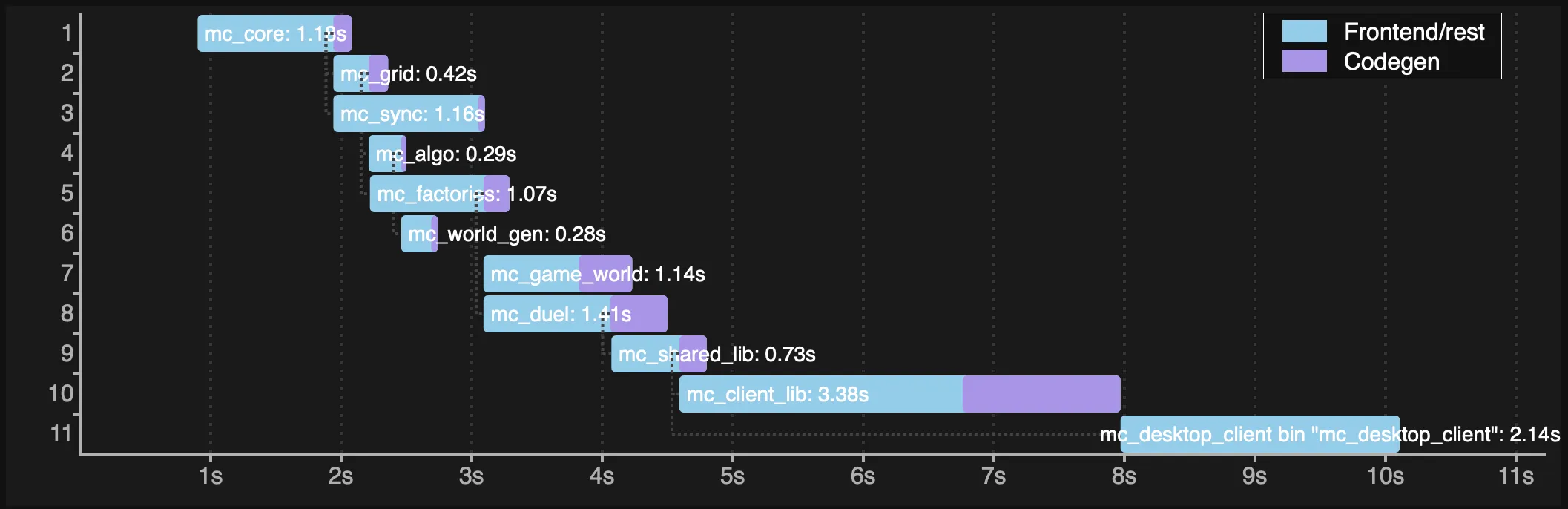
-
Changing an integer literal somewhere in
mc_coreBefore the refactor (total time: 8.9s):
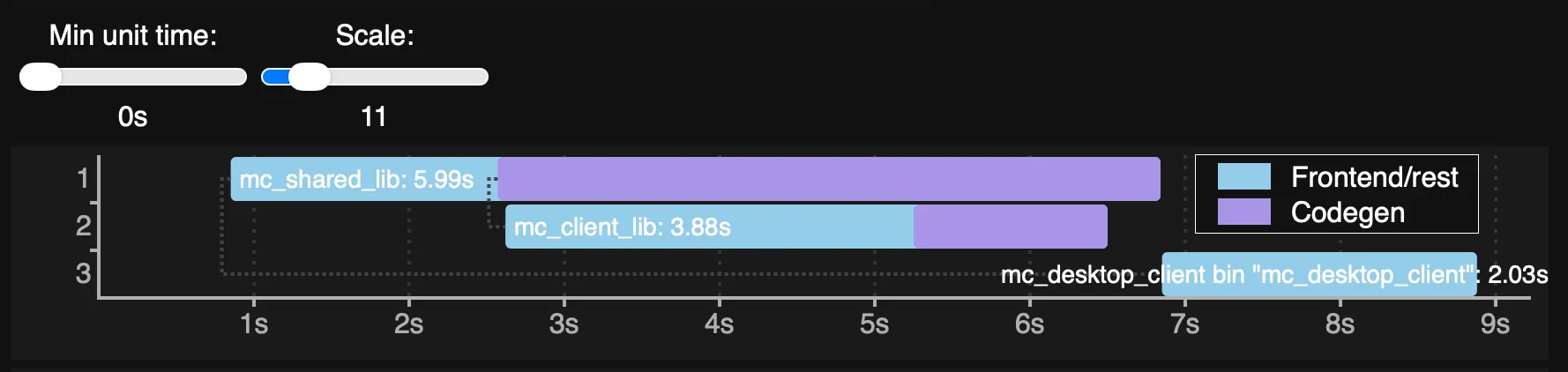
After the refactor (total time: 10.1s):
-
Adding a field to a resource struct in
mc_game_worldBefore the refactor (total time: 21.7s):
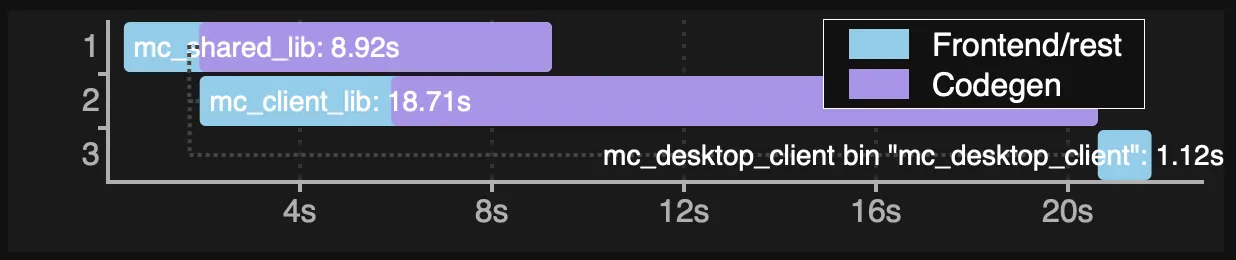
After the refactor (total time: 20.2s):
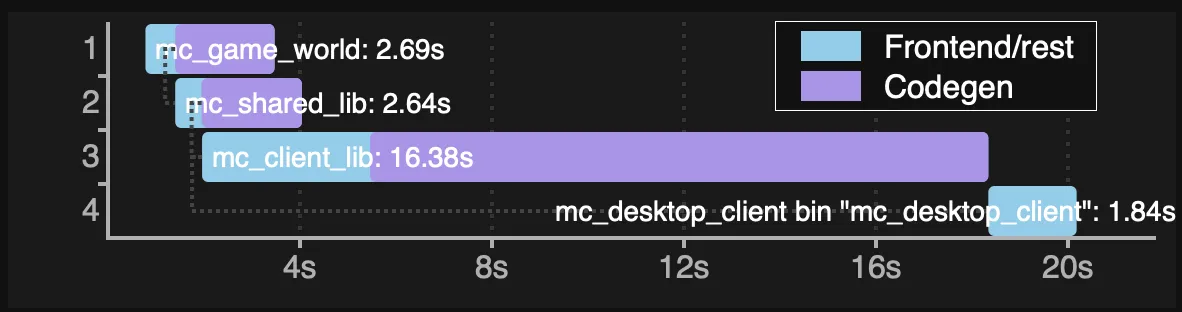
Well, the first results weren't encouraging. All of my largest crates were
rather organised in a sequence of dependencies than a tree, and there was
little opportunity for the compiler to build several crates in parallel.
The mc_client_lib crate was still remaining as one of the largest crates and
contributor to the time spent.
Also, there are a couple of things to note about incremental builds:
- Compilation times depend on a kind of a change made: changing a literal inside a crate will result in faster compilation times in comparison to changing data declarations, despite the literal change touching a crate deeper in the dependency tree.
- Introducing new crates brings additional overhead to build times. If there's little opportunity to parallelise compilation, incremental builds of a single crate might still perform better.
Second iteration
So while mc_shared_lib was taking quite significant time, and splitting it did help with parallel compilation of decoupled plugins,
it didn't quite lead to the result I was hoping for.
The timings were showing that mc_client_lib was taking even more time than mc_shared_lib.
So after spending a ridiculously long time moving even more code around and fixing imports, I was able to come up with the following structure:
 (Only client dependencies are shown)
Since significant total build time improvements aren't expected, let's take a look at incremental times again:
-
Changing a string literal of an egui system in
mc_client_transitions_uiBefore the refactor (total time: 12.3s):

After the refactor (total time: 7.1s):

-
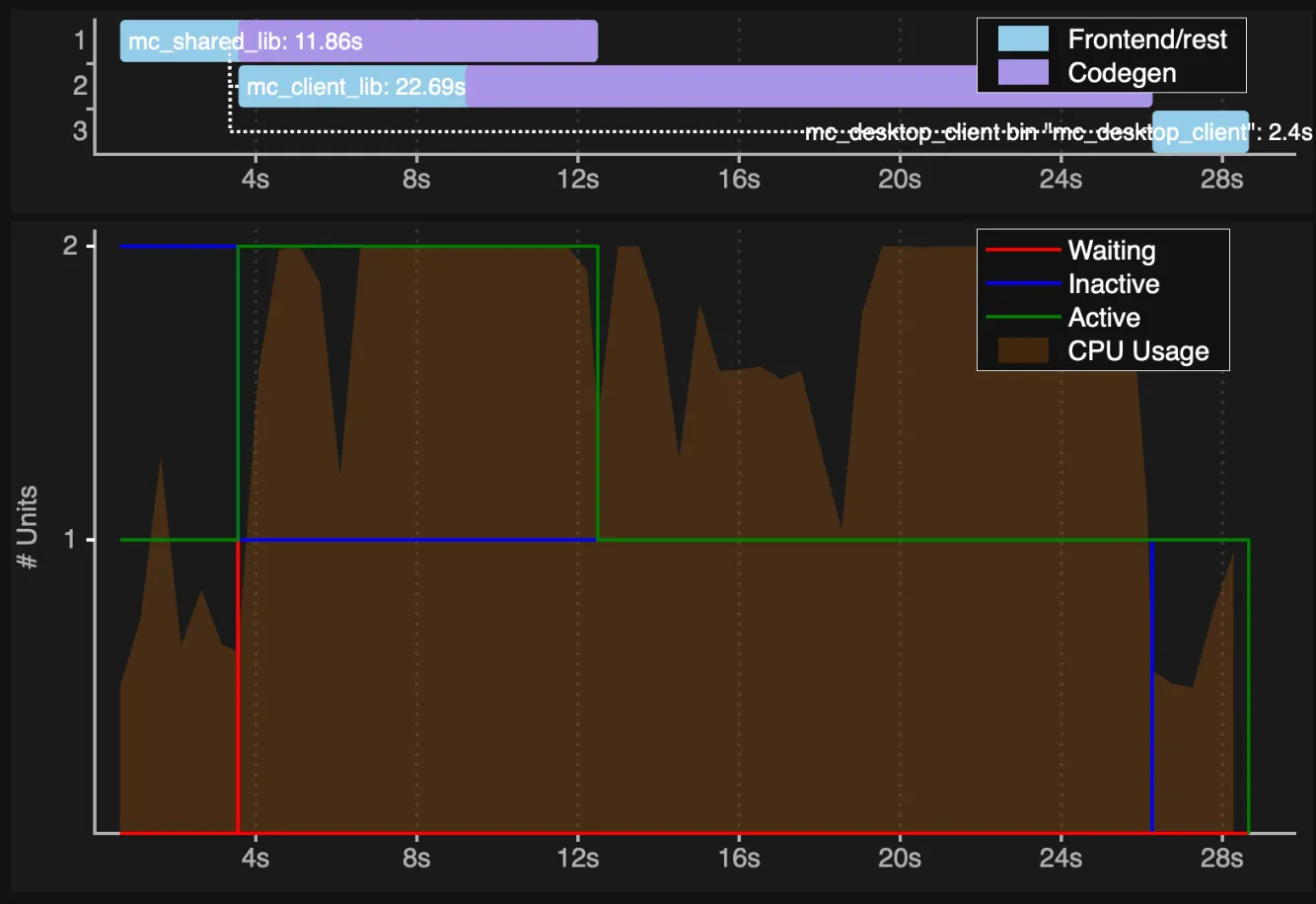
Adding a field to a resource struct in
mc_coreBefore the refactor (total time: 28.7s):
After the refactor (total time: 24.5s):
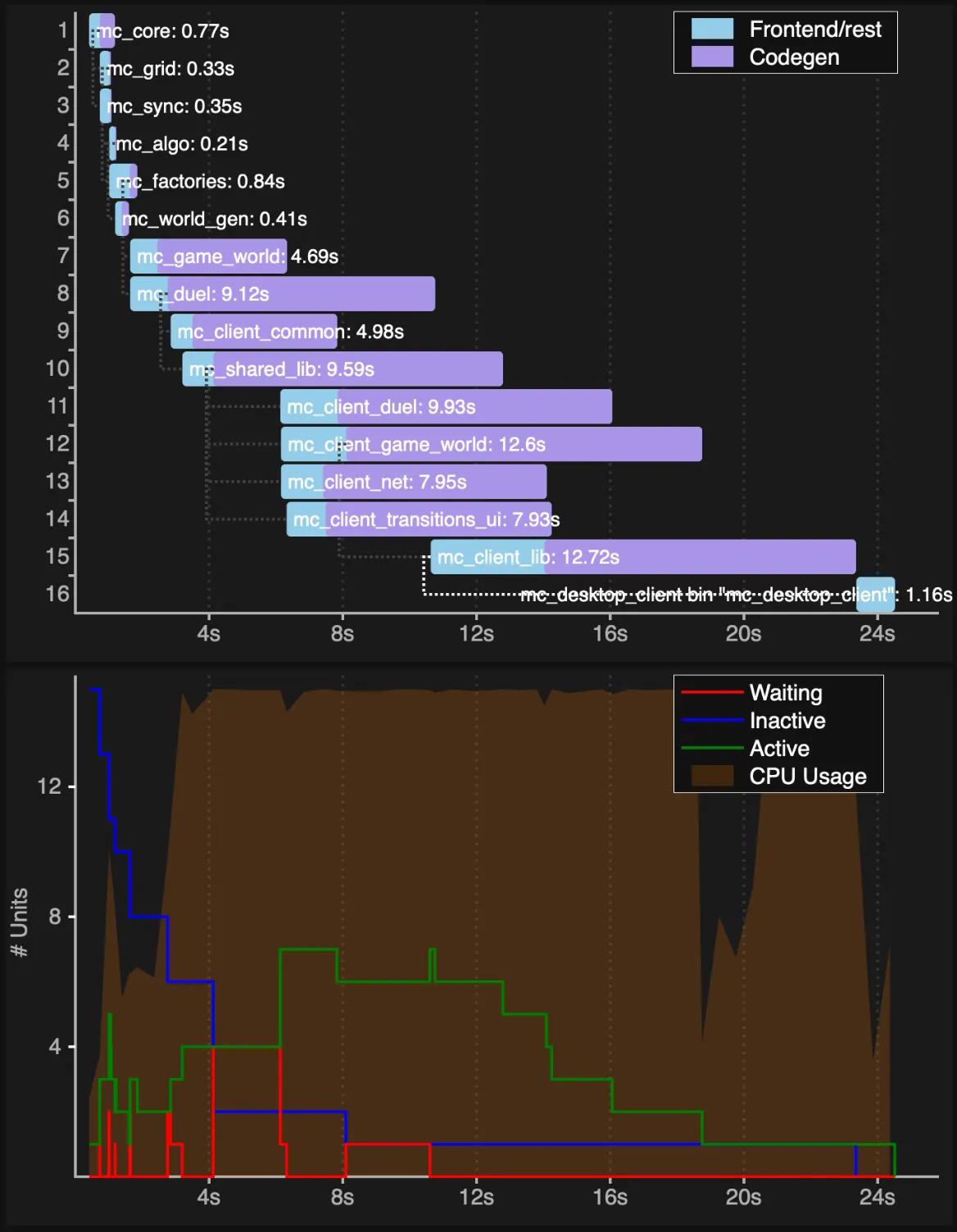
For the last attempt I also included the graph showing the concurrency over time.
It's quite interesting to see that despite a low number of concurrent units
(before the refactor), rustc still manages to keep CPU 100% busy for the most part,
but introducing new crates still brought some improvement.
So it seems like with the second iteration I was able to make build times 4-5s faster than in the original, thanks to splitting client crates.
Single-core performance
One of the curious things is that the compiler was spending a lot of time in "codegen", and if you sum the durations, it would seem that the total CPU time spent specifically in codegen became even longer (26s vs 46s).
How would it affect build time in environments with a low number of cores (for example my CI running in Github Actions where only 2 cores are available)?
So I compared the build time with the following command: cargo build -p mc_desktop_client -j1.
I used the scenario where I added a struct field to a resource in mc_core.
Luckily, the results turned out to be quite similar:
- 2m 48s before the refactor
- 2m 56s after the refactor
So that made me assume that codegen jobs are probably shared between multiple crates, or maybe there's another reason that would explain it, but summing the codegen durations was certainly a wrong way to interpret the graph.
Was it worth it?
These two iterations of refactor took more more than a week. (I'm glad I'm working on the project solo, otherwise it wouldn't be nice to generate conflicts for a week of work of other team members.)
I'm not proud of that performance, and I definitely had troubles concentrating on the work. At times, it was quite difficult to just find the mental capacity to come up with a plan of what code to move where, then to actually start moving it, and after that the exhausting sessions of fixing use statements followed. Hardly an interesting and creative work to keep myself focused.
Your experience might differ though, granted that you have more discipline and the skills to avoid distractions. 😅
In the end, I was able to cut 5s seconds of build time. And write this blog post... which took me another two weeks..... 🥲 But hey! For trivial changes, such as UI tweaks, that means I'll have to wait 7s instead of 12s - that's 40% lower downtime between iterations. And as long as I keep the habit of creating crates for new pieces of functionality, the compile times shouldn't grow too quickly.
But I definitely don't regret that I took the time to organise my plugins better and refactor system ordering to use system sets.
As for having to navigate separate crates instead of module folders inside a single crates, I'm yet to see whether this affects my experience.
If you are using the subsecond crate for
hot patching,
splitting a project into multiple crates to save on build time is probably not worth
it at all. Unfortunately, as of Bevy 0.17 and subsecond 0.7, hot patching is
impossible for projects that use workspaces.
Moving code around can be less annoying
The biggest annoyance that comes with extracting code to new crates is fixing use statements.
I use RustRover, which does a great job moving stuff around, even between crates. Unfortunately, it has its own quirks and limitations: for example, to fix moved code due to missing use statements, it'll sometimes try to import a symbol from a private module, even though another public export exists. You might also need to move stuff out that depends on private modules - in that case RustRover has no chance of auto-adding use statements for you, unless you make the module chain public in advance.
There I thought: what if I finally give those LLM tools a try? For context, I'm extremely sceptical of AI tools, I hate all the GenAI slop that pretends to be "art", and I strongly believe that they shouldn't be used for anything creative or requiring reliability and security.
Also, what have you done to RAM prices, ye bastards?!
Well, moving code is quite a stupid and mechanical task, and considering how time consuming it was for me, and how conventional tools sucked at it, I thought I'd give AI a go.
For the sake of not diverting the discussion into the AI topic, I won't be mentioning the models I tried (and please don't ask me about that in the comments), but I'll share that I had some miserable experience with one model, and really great one with some other model, which was able to automate the whole process of moving the code, fixing imports iteratively, and it did so with very little handholding from my end.
So if you find yourself in the same struggle as me, you may find this to be a good method of saving some sanity and time.
Depending on Bevy subcrates instead of the main crate
So there's been a lot of talk about incremental builds, but clean builds might be something you'll want to address as well. For example, if you have set up CI/CD and your project's cache gets invalidated often, it might save you some build minutes and cents (granted that your CI runners are multicore and can benefit from parallelisation).
Let's imagine you have a heavy core crate that depends only on the ECS part of Bevy. So consider two different dependency declarations:
bevy = { version = "0.17", default-features = false }bevy_ecs = { version = "0.17", default-features = false }Even though Bevy is specified without default features, chances are that your core crate won't benefit from that at all and will wait for the full Bevy compilation.
So why's that? Cargo features are additive, which means that if your final binary crate
depends on Bevy with a full set of features, your core crate will wait for Bevy to compile
the same full set of features too. To make your crate wait only for the ECS part,
you should depend just on bevy_ecs.
Unfortunately, I couldn't make much use of the advice myself,
because my core crates depend on 3rd party Bevy plugins
that depend on bevy itself, which basically defeats the purpose of refactoring my own code.
So check your dependencies first, but if you see the opportunity, it might be worth it.
What I can share though is the experience of bevy_egui users that
contributed the subcrates refactor.
Thanks to the PR, bevy_egui was able to start compiling 4s earlier and in parallel with other
Bevy crates. Before the refactor, the whole application was waiting for bevy_egui,
which started compiling only after all the Bevy crates were done.
My (fruitless) attempts to analyse crates compile times
Tbh, when I was planning this section, I thought it would be the most interesting one. Well, for me the topic is still interesting, but rather as an unsolved mystery than a piece of knowledge that I can share.
Using self-profile
My intention was to get some deeper insights on why crates compilation was taking so long. The first thing I tried was the following command on one of my crates:
cargo rustc -p mc_client_game_world -- -Zself-profile
Intro to rustc profiling suggests several different ways on how to visualise the profiling
data. I used crox and then loaded the tracing data via the Google Chrome's devtools
performace tab.
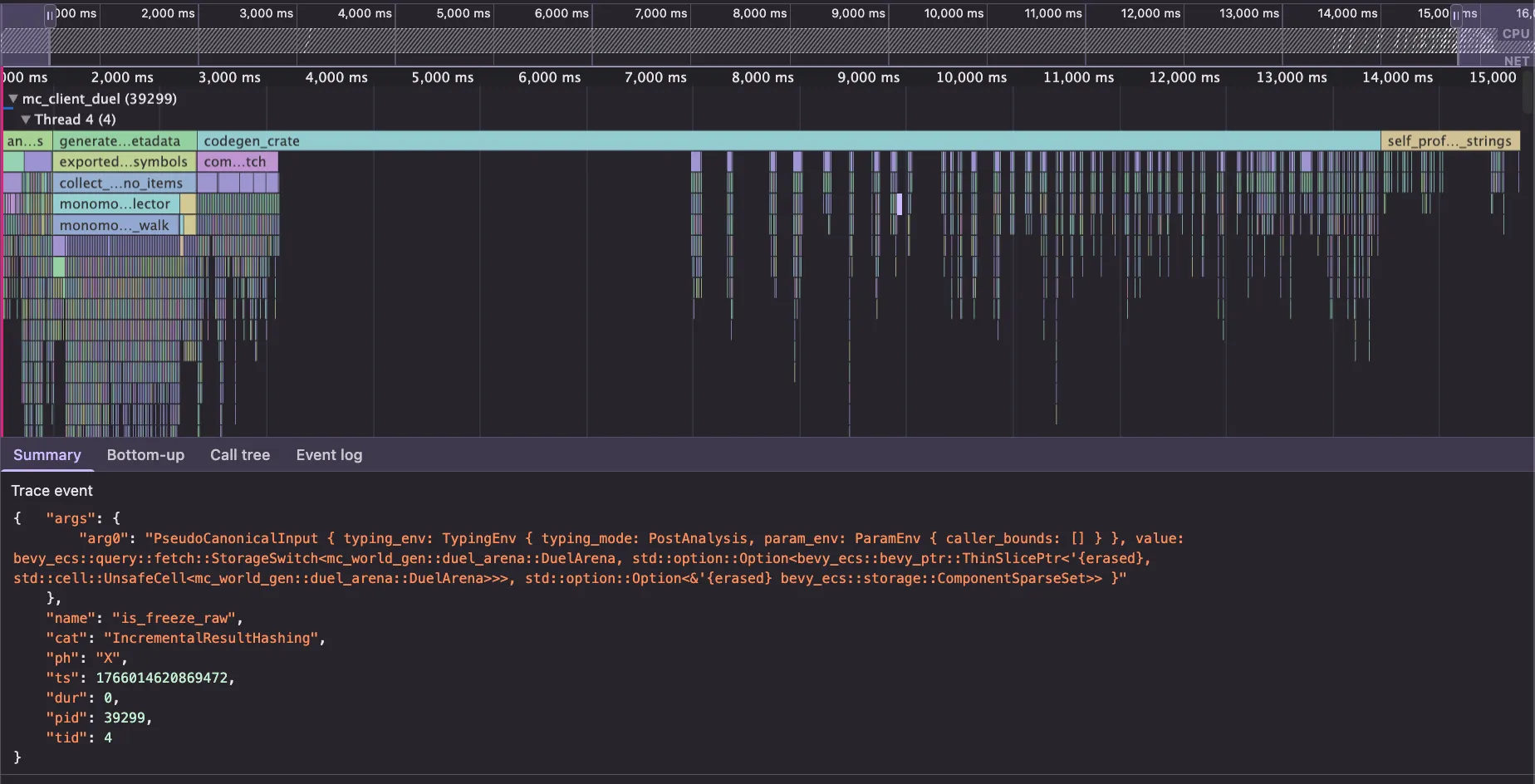
Well, here I could indeed confirm that a lot of time is spent on codegen, and I could find
some random types I recognised from my code in the event names,
but those were unfortunately of little use to me.
Other threads' tracks were also showing long LLVM traces
(codegen_module_perform_lto, LLVM_lto_optimize, LLVM_module_codegen, etc)
but they didn't have any event data I could use to correlate those to some specific
modules, types or functions in my code.
Using llvm-lines
The corrode article I've linked in the beginning suggests another tool for profiling compile times, so I used it with this command:
cargo llvm-lines -p mc_client_game_world | head -100
Lines                 Copies              Function name
-----                 ------              -------------
314946                7528                (TOTAL)
 1146 (0.4%,  0.4%)     1 (0.0%,  0.0%)  <bevy_ecs[804835f46b3fc247]::bundle::insert::BundleInserter>::insert::<(bevy_mesh[d19c1a0ff783a540]::components::Mesh3d, bevy_pbr[3a110082553755ab]::mesh_material::MeshMaterial3d<bevy_pbr[3a110082553755ab]::pbr_material::StandardMaterial>, bevy_camera[b927b680d50960fa]::visibility::Visibility, mc_client_game_world[47c6450b0b7bf56d]::grid::game::GameCellMarker, bevy_camera[b927b680d50960fa]::visibility::render_layers::RenderLayers, bevy_ecs[804835f46b3fc247]::name::Name)>
 1146 (0.4%,  0.7%)     1 (0.0%,  0.0%)  <bevy_ecs[804835f46b3fc247]::bundle::insert::BundleInserter>::insert::<(bevy_mesh[d19c1a0ff783a540]::components::Mesh3d, bevy_pbr[3a110082553755ab]::mesh_material::MeshMaterial3d<bevy_pbr[3a110082553755ab]::pbr_material::StandardMaterial>, bevy_transform[3b77ee0df2f8546f]::components::transform::Transform, bevy_camera[b927b680d50960fa]::visibility::render_layers::RenderLayers, bevy_ecs[804835f46b3fc247]::name::Name)>
 1146 (0.4%,  1.1%)     1 (0.0%,  0.0%)  <bevy_ecs[804835f46b3fc247]::bundle::insert::BundleInserter>::insert::<bevy_camera[b927b680d50960fa]::visibility::Visibility>
 1146 (0.4%,  1.5%)     1 (0.0%,  0.1%)  <bevy_ecs[804835f46b3fc247]::bundle::insert::BundleInserter>::insert::<bevy_ecs[804835f46b3fc247]::name::Name>
 1146 (0.4%,  1.8%)     1 (0.0%,  0.1%)  <bevy_ecs[804835f46b3fc247]::bundle::insert::BundleInserter>::insert::<bevy_transform[3b77ee0df2f8546f]::components::transform::Transform>
 1091 (0.3%,  2.2%)     1 (0.0%,  0.1%)  <bevy_ecs[804835f46b3fc247]::bundle::remove::BundleRemover>::remove::<(), <bevy_ecs[804835f46b3fc247]::bundle::remove::BundleRemover>::empty_pre_remove>
  971 (0.3%,  2.5%)     1 (0.0%,  0.1%)  mc_client_game_world[47c6450b0b7bf56d]::tutorial::hypotenuse_tutorial_system::{closure#0}
  924 (0.3%,  2.8%)     1 (0.0%,  0.1%)  <egui[4fb8f844c1708972]::containers::panel::SidePanel>::show_inside_dyn::<()>
  687 (0.2%,  3.0%)     1 (0.0%,  0.1%)  <bevy_pbr[3a110082553755ab]::pbr_material::StandardMaterial as core[d60e9e92b7ea731d]::clone::Clone>::clone
  611 (0.2%,  3.2%)     1 (0.0%,  0.1%)  mc_client_game_world[47c6450b0b7bf56d]::grid::game::maintain_pool_system
  608 (0.2%,  3.4%)     1 (0.0%,  0.1%)  <egui_extras[85a40d2304bbfb92]::layout::StripLayout>::add::<mc_client_game_world[47c6450b0b7bf56d]::ui::side_panel_ui_system::{closure#1}::{closure#0}::{closure#0}>
  608 (0.2%,  3.6%)     1 (0.0%,  0.2%)  <egui_extras[85a40d2304bbfb92]::layout::StripLayout>::add::<mc_client_game_world[47c6450b0b7bf56d]::ui::side_panel_ui_system::{closure#1}::{closure#0}::{closure#1}>
  583 (0.2%,  3.8%)     1 (0.0%,  0.2%)  <bevy_ecs[804835f46b3fc247]::query::iter::QueryIterationCursor<bevy_ecs[804835f46b3fc247]::entity::Entity, bevy_ecs[804835f46b3fc247]::query::filter::With<mc_factories[169f1b43b646f8b4]::WorldObjectMarker>>>::next
  583 (0.2%,  3.9%)     1 (0.0%,  0.2%)  <bevy_ecs[804835f46b3fc247]::query::iter::QueryIterationCursor<bevy_ecs[804835f46b3fc247]::entity::Entity, bevy_ecs[804835f46b3fc247]::query::filter::With<mc_factories[169f1b43b646f8b4]::enemy::EnemyMarker>>>::next
  579 (0.2%,  4.1%)     1 (0.0%,  0.2%)  <bevy_ecs[804835f46b3fc247]::query::iter::QueryIterationCursor<(&mc_factories[169f1b43b646f8b4]::player::client::GameWorldSubCameraOf, &mc_client_common[bd78e31f38ff98c9]::CellsPool), ()>>::next
  575 (0.2%,  4.3%)     1 (0.0%,  0.2%)  <bumpalo[f9130ebd059d1af8]::Bump>::try_alloc_layout_fast
  573 (0.2%,  4.5%)     1 (0.0%,  0.2%)  <bevy_ecs[804835f46b3fc247]::query::iter::QueryIterationCursor<mc_client_game_world[47c6450b0b7bf56d]::ui::PlayerQueryData, bevy_ecs[804835f46b3fc247]::query::filter::With<mc_factories[169f1b43b646f8b4]::player::client::LocalPlayerMarker>>>::next
  571 (0.2%,  4.7%)     1 (0.0%,  0.2%)  <bevy_ecs[804835f46b3fc247]::query::iter::QueryIterationCursor<&mut lightyear_messages[ae6c26cb4dbe3fc9]::receive::MessageReceiver<mc_shared_lib[dd73f0fa7a6b9d67]::protocol::GameGridChunkNetworkMessage>, ()>>::next
  571 (0.2%,  4.8%)     1 (0.0%,  0.3%)  <bevy_ecs[804835f46b3fc247]::query::iter::QueryIterationCursor<&mut lightyear_messages[ae6c26cb4dbe3fc9]::receive::MessageReceiver<mc_shared_lib[dd73f0fa7a6b9d67]::protocol::WorldSeedNetworkMessage>, ()>>::next
  571 (0.2%,  5.0%)     1 (0.0%,  0.3%)  <bevy_ecs[804835f46b3fc247]::query::iter::QueryIterationCursor<&mut mc_client_common[bd78e31f38ff98c9]::OccupiedScreenSpace, ()>>::next
  571 (0.2%,  5.2%)     1 (0.0%,  0.3%)  <bevy_ecs[804835f46b3fc247]::query::iter::QueryIterationCursor<(&bevy_ecs[804835f46b3fc247]::hierarchy::ChildOf, &mut bevy_transform[3b77ee0df2f8546f]::components::transform::Transform, &mut mc_render_resources[392f36dd15666f8d]::animations::TraderNpcAnimationState), bevy_ecs[804835f46b3fc247]::query::filter::With<mc_factories[169f1b43b646f8b4]::trader_npc::TraderNpcChildMarker>>>::next
  571 (0.2%,  5.4%)     1 (0.0%,  0.3%)  <bevy_ecs[804835f46b3fc247]::query::iter::QueryIterationCursor<(&bevy_ecs[804835f46b3fc247]::hierarchy::ChildOf, &mut mc_render_resources[392f36dd15666f8d]::animations::TreasureChestAnimationState, &mut bevy_transform[3b77ee0df2f8546f]::components::transform::Transform), bevy_ecs[804835f46b3fc247]::query::filter::With<mc_factories[169f1b43b646f8b4]::treasure_chest::TreasureChestLidMarker>>>::next
  571 (0.2%,  5.6%)     1 (0.0%,  0.3%)  <bevy_ecs[804835f46b3fc247]::query::iter::QueryIterationCursor<(&bevy_transform[3b77ee0df2f8546f]::components::global_transform::GlobalTransform, &bevy_camera[b927b680d50960fa]::projection::Projection, &mut mc_client_game_world[47c6450b0b7bf56d]::grid::game::VisibleArea), bevy_ecs[804835f46b3fc247]::query::filter::With<mc_factories[169f1b43b646f8b4]::player::client::GameWorldSubCameraOf>>>::next
  571 (0.2%,  5.8%)     1 (0.0%,  0.3%)  <bevy_ecs[804835f46b3fc247]::query::iter::QueryIterationCursor<(&mc_factories[169f1b43b646f8b4]::player::client::GameWorldSubCameraOf, &mut mc_client_common[bd78e31f38ff98c9]::CellsPool, &mc_client_game_world[47c6450b0b7bf56d]::grid::game::VisibleArea), ()>>::next
  571 (0.2%,  5.9%)     1 (0.0%,  0.3%)  <bevy_ecs[804835f46b3fc247]::query::iter::QueryIterationCursor<(&mc_grid[70eabe270082d7ce]::spatial_hash::GridPosition, &mc_factories[169f1b43b646f8b4]::player::PlayerDirection, core[d60e9e92b7ea731d]::option::Option<&mc_factories[169f1b43b646f8b4]::player::client::LocalPlayerMarker>, &mut bevy_transform[3b77ee0df2f8546f]::components::transform::Transform), bevy_ecs[804835f46b3fc247]::query::filter::With<mc_core[d32124638565aa86]::PlayerId>>>::next
  571 (0.2%,  6.1%)     1 (0.0%,  0.3%)  <bevy_ecs[804835f46b3fc247]::query::iter::QueryIterationCursor<(&mc_grid[70eabe270082d7ce]::spatial_hash::GridPosition, &mut bevy_transform[3b77ee0df2f8546f]::components::transform::Transform), (bevy_ecs[804835f46b3fc247]::query::filter::With<mc_factories[169f1b43b646f8b4]::WorldObjectMarker>, bevy_ecs[804835f46b3fc247]::query::filter::Without<mc_core[d32124638565aa86]::PlayerId>)>>::next
  571 (0.2%,  6.3%)     1 (0.0%,  0.4%)  <bevy_ecs[804835f46b3fc247]::query::iter::QueryIterationCursor<(&mut bevy_egui[860832307071e53]::EguiContext, core[d60e9e92b7ea731d]::option::Option<&bevy_egui[860832307071e53]::PrimaryEguiContext>), ()>>::next
  571 (0.2%,  6.5%)     1 (0.0%,  0.4%)  <bevy_ecs[804835f46b3fc247]::query::iter::QueryIterationCursor<(&mut mc_client_game_world[47c6450b0b7bf56d]::grid::game::VisibleArea, &mut mc_client_common[bd78e31f38ff98c9]::CellsPool), bevy_ecs[804835f46b3fc247]::query::filter::With<mc_factories[169f1b43b646f8b4]::player::client::GameWorldSubCameraOf>>>::next
  571 (0.2%,  6.7%)     1 (0.0%,  0.4%)  <bevy_ecs[804835f46b3fc247]::query::iter::QueryIterationCursor<(bevy_ecs[804835f46b3fc247]::change_detection::Ref<mc_grid[70eabe270082d7ce]::spatial_hash::GridPosition>, bevy_ecs[804835f46b3fc247]::change_detection::Ref<mc_factories[169f1b43b646f8b4]::player::PlayerAttributes>, &mut mc_factories[169f1b43b646f8b4]::player::client::DiscoveredCells), bevy_ecs[804835f46b3fc247]::query::filter::With<mc_factories[169f1b43b646f8b4]::player::client::LocalPlayerMarker>>>::next
  571 (0.2%,  6.8%)     1 (0.0%,  0.4%)  <bevy_ecs[804835f46b3fc247]::query::iter::QueryIterationCursor<(bevy_ecs[804835f46b3fc247]::entity::Entity, &bevy_state[d73dda55e84bc137]::state_scoped::DespawnOnEnter<mc_client_game_world[47c6450b0b7bf56d]::tutorial::GameTutorialState>), ()>>::next
  571 (0.2%,  7.0%)     1 (0.0%,  0.4%)  <bevy_ecs[804835f46b3fc247]::query::iter::QueryIterationCursor<(bevy_ecs[804835f46b3fc247]::entity::Entity, &bevy_state[d73dda55e84bc137]::state_scoped::DespawnOnExit<mc_client_game_world[47c6450b0b7bf56d]::tutorial::GameTutorialState>), ()>>::next
  571 (0.2%,  7.2%)     1 (0.0%,  0.4%)  <bevy_ecs[804835f46b3fc247]::query::iter::QueryIterationCursor<(bevy_ecs[804835f46b3fc247]::entity::Entity, &mc_core[d32124638565aa86]::PlayerId), bevy_ecs[804835f46b3fc247]::query::filter::With<mc_core[d32124638565aa86]::GameWorldTag>>>::next
  571 (0.2%,  7.4%)     1 (0.0%,  0.4%)  <bevy_ecs[804835f46b3fc247]::query::iter::QueryIterationCursor<(bevy_ecs[804835f46b3fc247]::entity::Entity, &mc_grid[70eabe270082d7ce]::spatial_hash::GridPosition, &mut mc_factories[169f1b43b646f8b4]::player::client::SelectedObjectNearby, &mut mc_factories[169f1b43b646f8b4]::player::client::SelectableObjectsNearby), bevy_ecs[804835f46b3fc247]::query::filter::With<mc_factories[169f1b43b646f8b4]::player::client::LocalPlayerMarker>>>::next
  571 (0.2%,  7.6%)     1 (0.0%,  0.5%)  <bevy_ecs[804835f46b3fc247]::query::iter::QueryIterationCursor<(bevy_ecs[804835f46b3fc247]::entity::Entity, core[d60e9e92b7ea731d]::option::Option<&mc_core[d32124638565aa86]::PlayerId>), bevy_ecs[804835f46b3fc247]::query::filter::With<mc_factories[169f1b43b646f8b4]::DuelParticipant>>>::next
  569 (0.2%,  7.7%)     1 (0.0%,  0.5%)  <core[d60e9e92b7ea731d]::iter::adapters::flatten::FlattenCompat<core[d60e9e92b7ea731d]::iter::adapters::map::Map<core[d60e9e92b7ea731d]::iter::adapters::rev::Rev<core[d60e9e92b7ea731d]::ops::range::RangeInclusive<i32>>, mc_client_game_world[47c6450b0b7bf56d]::ui::map_ui::{closure#0}>, core[d60e9e92b7ea731d]::iter::adapters::chain::Chain<core[d60e9e92b7ea731d]::iter::adapters::map::Map<core[d60e9e92b7ea731d]::ops::range::RangeInclusive<i32>, mc_client_game_world[47c6450b0b7bf56d]::ui::map_ui::{closure#0}::{closure#0}>, core[d60e9e92b7ea731d]::array::iter::IntoIter<char, 1usize>>> as core[d60e9e92b7ea731d]::iter::traits::iterator::Iterator>::size_hint
  563 (0.2%,  7.9%)     1 (0.0%,  0.5%)  <bevy_ecs[804835f46b3fc247]::query::iter::QueryIterationCursor<&bevy_egui[860832307071e53]::EguiContext, bevy_ecs[804835f46b3fc247]::query::filter::With<bevy_egui[860832307071e53]::PrimaryEguiContext>>>::next
  563 (0.2%,  8.1%)     1 (0.0%,  0.5%)  <bevy_ecs[804835f46b3fc247]::query::iter::QueryIterationCursor<&mc_factories[169f1b43b646f8b4]::player::PlayerCellMarks, bevy_ecs[804835f46b3fc247]::query::filter::With<mc_factories[169f1b43b646f8b4]::player::client::LocalPlayerMarker>>>::next

...
A lot of the code that references these functions are just the
systems I've written, and a lot of generics obviously come from bevy_ecs generic
queries or bundle inserts.
Here's the most frequent culprit (the source of these 571 lines items): QueryIterationCursor::next. A lot of the calls reference methods of other generic types, so there isn't much that could be extracted to non-generic functions to save on compile times.
So I found the listed heavy codegen items aren't something I can really reduce without removing the functionality from my game.
Conclusions
I hope my blogpost highlighted how thinking of project structure can help with better code organisation, readibility and improve compile times. Groupping modules by features can naturally outline possible plugins, and extracting those to crates will help you think of game systems dependencies and may improve compile times.
Speaking of analysing compile times, my first experience with rustc profiling tools convinced me that those are more useful
and generate more actionable info for rustc developers themselves (which makes sense).
But I wish there were instruments more targeted at users of the Rust compiler,
for example something that could help with identifying a heavy module,
making it possible to iterate on it while measuring how different approaches
affect compile times.
As of now, the only tool I found most useful is cargo build --timings,
but the time between builds can vary too much on its own, making it not very
convenient to measure things reliably.
The other point is that.. well.. the code you write actually needs to be compiled. If your framework relies on generics heavily, that's an initial condition you can't change. So besides splitting crates and trying not to abuse generics too much in your own code, there isn't much I have found that can be done.
If you have success stories where profiling tools (or your own intuition and judgement) helped you to identify and refactor slowly compiling Bevy game, please share them!
Shameless Patreon plug
And in case you want to support me, my game or bevy_egui development, please use this ✨ Patreon ✨ link - there will be early access to my Bevy blogs and game progress, private Discord channels and more.